Color Control Center1.9
Publisher Description


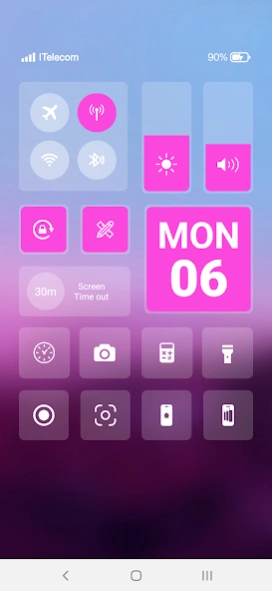

Control Center Color simple and easy to use features
With Color Control Center, you can quickly access multiple settings:
- Quick on/off: Wi-Fi, Bluetooth, Airplane Mode, Mobile Connection
- Volume adjust: quick and super-easy adjust volume by swiping up and down.
- Brightness adjust: swipe up for brighter screen and swipe down for darker screen.
- Camera: One click to open your camera, instant access to capture all your precious moments.
- Flashlight: One click to open your Flashlight
- Calculator: Easy using and quick access to your calculator
- Record Capture Screenshot Video: Quickly capture screenshot video
*NOTE
ACCESSIBILITY SERVICE
This app uses ACCESSIBILITY SERVICE
This application requires activation in the accessibility service to display the control center view on the mobile screen.
Additionally, this app utilizes accessibility service functionalities such as control music, control volume, and dismissing system dialogs, among other features.
This application does not accumulate or disclose any user information about this accessibility right.
No user data is stored by this application about this accessibility right.
About Color Control Center
The company that develops Color Control Center is Paragon Studio. The latest version released by its developer is 1.9.
To install Color Control Center on your Android device, just click the green Continue To App button above to start the installation process. The app is listed on our website since 2024-05-06 and was downloaded 6 times. We have already checked if the download link is safe, however for your own protection we recommend that you scan the downloaded app with your antivirus. Your antivirus may detect the Color Control Center as malware as malware if the download link to com.controlcenter.control_center_color is broken.
How to install Color Control Center on your Android device:
- Click on the Continue To App button on our website. This will redirect you to Google Play.
- Once the Color Control Center is shown in the Google Play listing of your Android device, you can start its download and installation. Tap on the Install button located below the search bar and to the right of the app icon.
- A pop-up window with the permissions required by Color Control Center will be shown. Click on Accept to continue the process.
- Color Control Center will be downloaded onto your device, displaying a progress. Once the download completes, the installation will start and you'll get a notification after the installation is finished.
Program Details
System requirements
Download information
Pricing
Version History
version 1.9
posted on 2024-05-06
version 1.5
posted on 2023-10-05
. Add video screen recorder and capture screenshot feature.
. Fix bugs
